ClarShot is now on the Chrome Web Store, for Chrome, Brave and Opera too.

Capture anything.
Upload nothing.

A free add-on for Chrome and Edge that takes screenshots and screen recordings. Mark them up, cover anything private, and send them. Everything stays on your computer.

  • No account
  • No watermark
  • No time limit
  • Nothing uploaded
  • 11 languages
Add to Chrome
See how it works

ClarShot works in Chrome and Edge on a computer, not on phones. Send yourself the link and open it there.

Free · Version 1.0.5, what's new

Real recording of the editor: cover the private column, mark the problem, export. Nothing was uploaded.

Who it is for

For work screenshots with private details in them

Client work, bug reports, how-tos. The file is saved on your computer, and you send it wherever you want.

Agencies and freelancers

Feedback for a client

Capture the whole page, mark what needs to change, number the steps, and hide anything the client should not see. Save it as an image or a PDF that opens anywhere.

Support and QA

Reporting a problem

Record your screen while the problem happens and say what you did. It is a normal video file: it opens anywhere and never expires.

Teams

Showing a colleague how

Capture each step and add arrows and numbers, or record it. Send it by chat or email, or add it to your team's guide.

How it works

One capture, start to finish

Five steps, drawn over a real screenshot of a demo app.
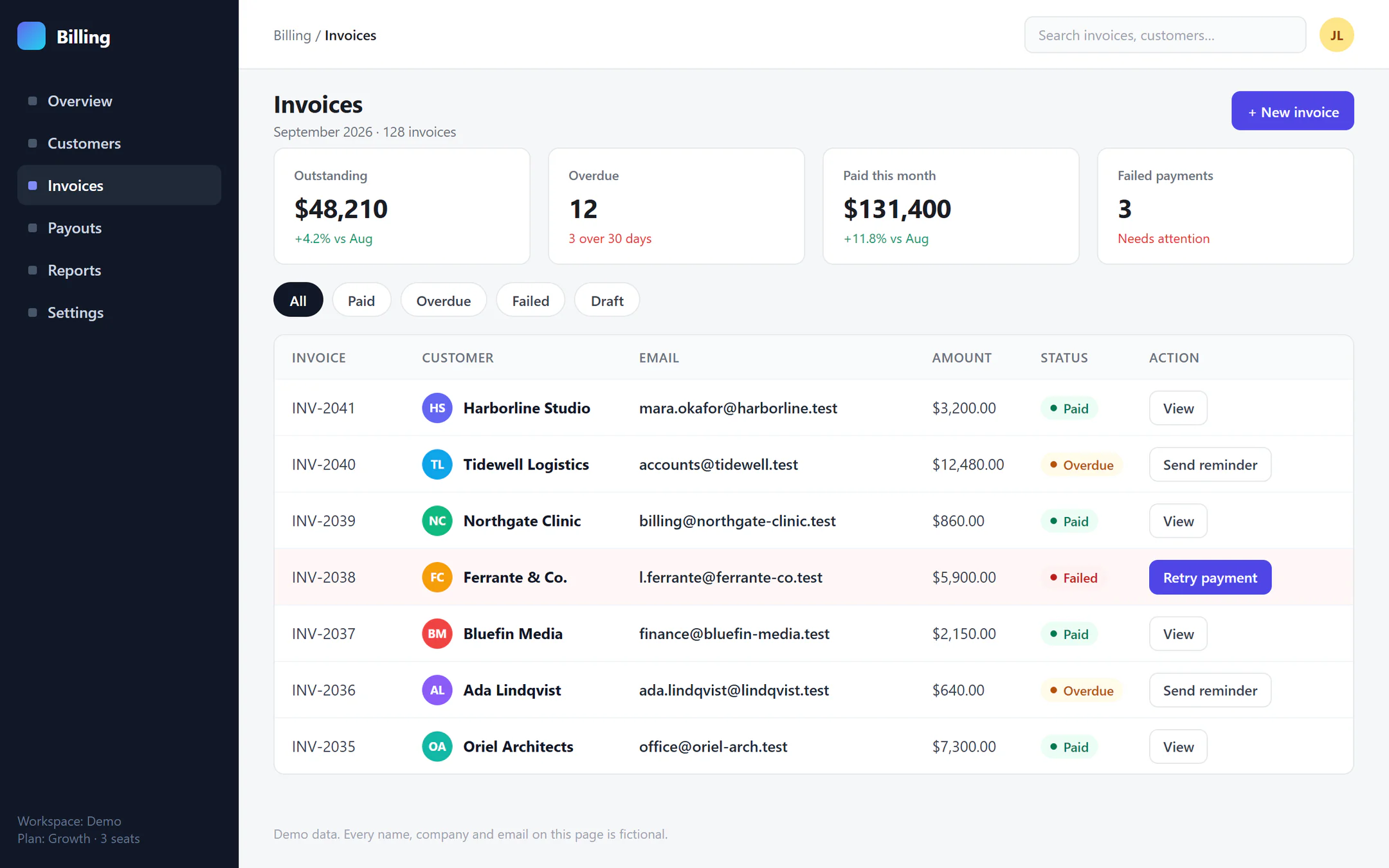
A demo billing app with a table of seven invoices, each with a customer, an email address, an amount and a status; one payment has failed
  1. 1

    Capture

    Click the ClarShot button next to the address bar and drag over what matters. You can also capture the whole page, a long chat or list, or just what is on screen. The editor opens a moment later.

  2. 2

    Mark

    Box the failed payment, number it, point at the button. Arrows, boxes, text and step numbers, with no learning curve.

  3. 3

    Hide

    Cover the email column with Solid. The pixels are replaced in the exported file, so there is nothing underneath to recover.

  4. 4

    Record

    Need to show it moving? Record the tab, a window or the whole screen, with your voice and an optional camera bubble. No time limit, no watermark.

  5. 5

    Send

    Save it as an image, a PDF or a video, or copy and paste it into an email or a chat. ClarShot itself sends nothing.
ShortcutsVisible Alt Shift VRegion Alt Shift DFull page Alt Shift FRecord Alt Shift SScrolling area and Timer are in the popup.

Try it here, nothing to install

Cover it. Then try to break it.

Blurred text can often be read back. A solid block cannot. Try both here.

Drag over the demo table to cover what should stay private, then download the PNG. Every name and email in it is fictional.

Add to Chrome

ClarShot works in Chrome and Edge on a computer, not on phones. Send yourself the link and open it there.

Free · No account · Works offline

Private by design

Your screenshots never leave your computer.

Screenshots can show client data, messages, even medical records. ClarShot sends nothing anywhere: no account, no tracking, no usage statistics, no crash reports.

Check it yourself, in about a minute
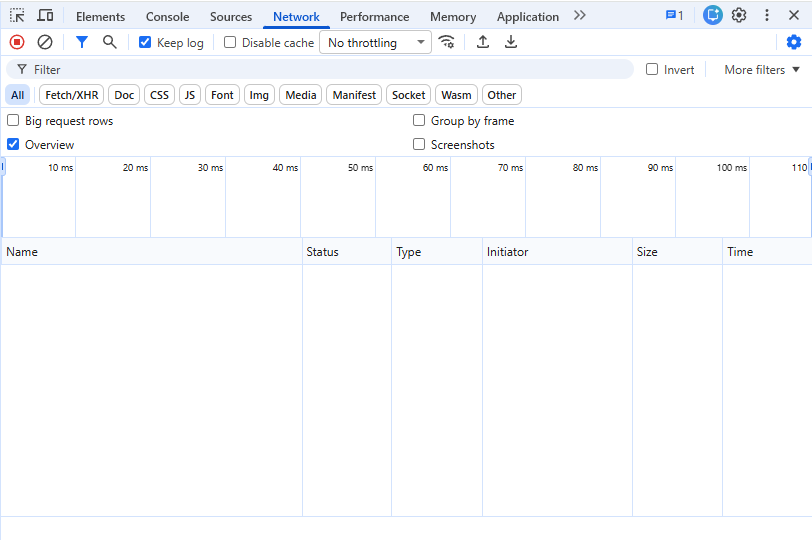
  1. 1Open a capture in the editor, press F12 and pick the Network tab.
  2. 2Clear the list, then annotate, download, copy.
  3. 3The list stays empty. That is the whole proof.

This website, right now: counting requests to other sites. Counted by your own browser, in this tab.

It asks for 6 permissions, none of them for "all websites". See each one explained, or read the privacy promise.

Chrome DevTools, Network tab, after a capture was annotated, downloaded and copied in the ClarShot editor: the request list is empty
Real screenshot: the browser's own list of connections (DevTools, Network tab), still empty after Download and Copy in the editor.

What it costs

Free, where others charge

Everything below is in the free extension today, with no watermark and no time limit, and it stays free.

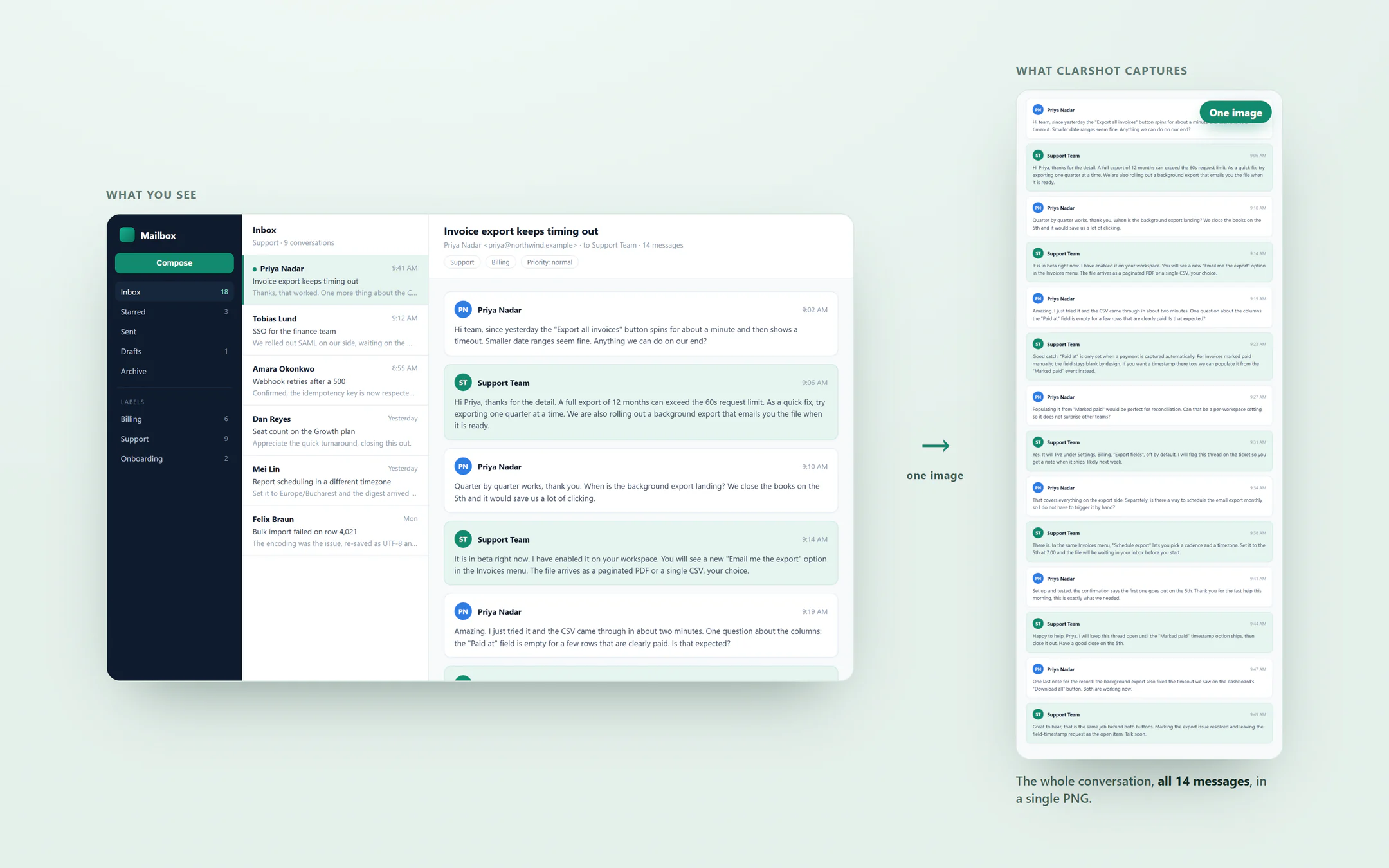
On the left, a Mailbox app whose reading pane shows only a few messages of a support thread. On the right, ClarShot's capture of that panel: the whole conversation, all fourteen messages, in one tall image.
Scrolling area: the whole thread in one image, where a normal full-page capture only gets what fits in the panel.
  • Scrolling-area capture, for chats, feeds and long tablesoften paidFree here
  • Screen recording with no time limit and no watermarklimited or paidFree here
  • A solid cover that cannot be removed from the saved fileoften paidFree here
  • PDF split into A4 or Letter pagesmultipage often paidFree here
  • Hiding private details without an account or an uploadoften requiredFree here

The grey tags describe the category of capture tools, checked on 22 September 2026 against public price pages. No single tool is described.

Pro, in development

A one-time purchase for extras such as your logo on every screenshot. Nothing free today moves to Pro.

Questions

What is ClarShot?

ClarShot is a free browser extension for full-page screenshots, screen recording and annotation, on Chrome and Edge. Everything happens on your device: it makes no network requests, needs no account and adds no watermark or time limit.

What is a browser extension?

A small add-on for your browser. ClarShot puts a button next to the address bar, and you click it to capture or record. It installs from the browser's own store in a minute and is removed the same way.

Is it really free?

Yes. Capture, record, annotate and export are free, with no watermark and no time limit, and that stays free. Pro, a one-time purchase still in development, will add extras such as your brand on every export. Nothing that is free today moves to Pro.

Where do my files go?

Exports go to your Downloads folder or to your clipboard. The last 10 images you saved or copied stay in the popup's Recent list, on this device, until you remove them. It all works offline. We never receive a copy of anything.

How do I share a screenshot or a recording?

Screenshots: click Copy in the editor and paste into an email or a chat with Ctrl+V (Cmd+V on a Mac), or Download the file. Recordings: the video is a normal file, WebM or MP4. Send it through Drive, OneDrive, Slack or WhatsApp as a document, so it is not shrunk like a photo. There are no share links, because nothing is uploaded anywhere.

Which browsers does it work in?

Chrome, Edge, Brave, Opera, and most other browsers built on Chrome, such as Vivaldi and Arc, on Windows, Mac, Linux and ChromeOS.

Is it open source?

Not yet. You don't need the source to check the promise: the Privacy section on this page shows how to see for yourself that nothing is sent. Publishing the core later is on the table.

Who builds this?

Voicu.app, a small independent studio in Cluj, Romania. Company details are on the Legal page, and support@clarshot.com reaches a person.

Another question? See Support or write to us. A person reads every email.

Capture anything.
Upload nothing.

Free, no account. Nothing leaves your computer.

Add to Chrome

ClarShot works in Chrome and Edge on a computer, not on phones. Send yourself the link and open it there.

Free · No account · Works offline
